AI-PoweredTransform raster images into perfect vectors instantly
Convert PNG & JPG to
scalable SVG
Professional raster-to-vector conversion powered by AI. Upload any image and get crisp SVG, DXF, EPS, or PDF files — perfect for Cricut, laser cutting, embroidery, and commercial printing.
- No signup required
- 5 free credits
- All export formats included
See the difference.
Drag the slider to reveal the transformation. Our AI rebuilds real geometry—circles, smooth curves, clean paths—not just pixel outlines.
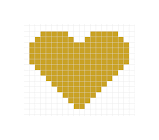
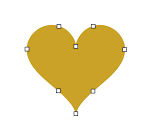
Pixel Heart
Pixel-grid artwork with preserved background grid and control points
Works with every cutter and machine.
Cricut. Laser. Embroidery. Whatever you make with, Vectroy outputs the exact file format it needs.
How it works.
Four steps from image to production-ready vector.
Upload your image
Drop a PNG, JPG, or WebP. No account needed. Up to 50 MB.
AI traces in real time
Our algorithm detects edges, removes backgrounds, and builds clean paths in seconds.
Fine-tune if needed
Adjust smoothing, threshold, and background removal. Preview updates instantly.
Download your vector
SVG, DXF, EPS, PDF, G-code, or DST. Ready for print, cut, or code.
No limits on batch size. Convert 1 file or 1,000. Same price, same speed.
See what's possible.
From simple logos to detailed illustrations, our users convert every type of image. Explore examples across design categories.

Coffee Logo
Stylised coffee cup logo converted to clean vector paths

Food & Beverage Logo
Restaurant branding mark converted from raster to scalable SVG

Gradient Logo
Modern gradient brand mark with preserved colour transitions
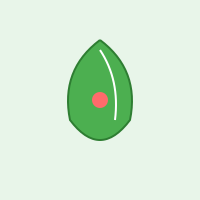
Leaf Logo
Nature-inspired logo with smooth organic curves

Sports Logo
Athletic emblem with crisp edges for screen printing

Tech Logo
Geometric technology brand mark in clean vector form
Watch it in action.
From upload to download in under 10 seconds. See how our AI traces edges and rebuilds real geometry.
Demo video: Logo vectorization, format selection, and export
Ready to vectorize?
Upload any image and get crisp, scalable vectors in seconds. No sign-up required.
Try with your own image
Drag and drop your image here, or click to browse
Supported formats:
Max file size: 50 MB
From raster to vector in seconds.
Whether you need a logo for your website or a design for your Cricut, Vectroy converts any image into production-ready vectors.
Feature 1: AI Vectorization
Traces edges, shapes, and gradients into clean vector paths. Works on logos, illustrations, and photos — from simple icons to complex scenes.
Edge detection · path simplification
Feature 2: Background Removal
Strip backgrounds before vectorizing for cleaner results. One click, AI-powered. Perfect for product photos, logos, and graphics that need transparent backgrounds.
AI-powered · batch support
Feature 3: 7 Export Formats
SVG for web, DXF for CAD, EPS for print, G-code for laser cutters, DST for embroidery machines. One conversion, every format you need.
SVG · DXF · EPS · PDF · G-code · DST · AI
What actually makes a good vector.
Pick a detail to see how Vectroy handles it, compared with a straight raster trace.
Sub-pixel precision — illustrative comparison
Better than the alternatives.
Fast, accurate tracing with all the export formats you need. No subscriptions, no bloat.
| Feature | Vectroy | Adobe Illustrator | Vector Magic | Online tools |
|---|---|---|---|---|
| AI-powered tracing | Yes | Yes | Yes | Basic |
| Background removal | Yes | Manual | No | No |
| Batch processing (50 files) | Yes | Scripted | No | No |
| Embroidery export (DST) | Yes | Plugin | No | No |
| G-code for laser/CNC | Yes | No | No | No |
| Browser-based | Yes | No | No | Yes |
Made for the way you work.
The same conversion, tuned to what your next step needs — a cut file, a print-ready vector, or an API call.
Logos and brand archives
Turn a low-res logo export back into clean geometry, then ship every size without re-drawing it.
SVGEPSPDFLearn moreCricut, vinyl and screen printing
Get cut-ready paths with no stray nodes or gaps, so the blade follows the line you meant.
SVGDXFLearn moreLaser, CNC and engraving
Export toolpaths for production machines, with clean contours on every part of the job.
DXFG-codeLearn moreIllustrations and line art
Keep the hand-drawn character while collapsing thousands of stray points into editable paths.
SVGPDFLearn moreEmbroidery digitizing
Hand off clean outlines to digitizing software, so stitch paths come out predictable.
SVGDSTLearn moreDevelopers and pipelines
Drive conversions from your own build with the API, and get identical output on every run.
APISVGLearn more
Bitmap vs Vector — why it matters.
Bitmap (Raster)
- Made of fixed pixels
- Blurry when enlarged
- Large file sizes
- Not editable
Bitmap use cases
Photos
Photographs and natural images
Screenshots
Complex raster graphics
Artwork
Hand-painted digital art
Loved by makers and builders.
From Etsy sellers to production shops, Vectroy saves time and eliminates file conversion headaches.
“We were spending 3-4 hours per day converting customer artwork. Vectroy cut that to 20 minutes. Our clients love the faster turnaround, and we love not being the bottleneck.”
Sarah Chen
Owner, Precision Screen Print Co.
“As someone who just started with a Cricut, figuring out SVG files was overwhelming. Vectroy made it dead simple—upload, download, done. I actually use my machine now!”
Marcus Thompson
Small Business Owner, Etsy
“The API integration was seamless. We now batch-process 200+ designs per day without any manual intervention. Best decision we made for production automation.”
Kenji Nakamura
Tech Lead, Print-on-Demand Startup
Learn how to vectorize smarter.
Guides, tutorials, and best practices for every use case—from Cricut designs to embroidery digitizing.
GUIDE
How to Prepare Images for Cricut
Best practices for clean SVG exports and avoiding common cutting errors.
Read more →TUTORIAL
Embroidery File Formats Explained
DST vs PES vs JEF: which format works for your machine.
Read more →TIPS
Vectorizing Hand-Drawn Designs
Getting the best results from sketches, scans, and artwork photos.
Read more →Pick the right format for your machine.
All formats included with every conversion. Choose based on your workflow.
| Feature | SVG | DXF | EPS | |
|---|---|---|---|---|
| Web use | — | — | — | |
| Print ready | — | |||
| CAD/CNC | — | — | — | |
| Laser cutting | ||||
| Scalable | ||||
| Editable paths | Limited | |||
| Color layers | ||||
| File size | Small | Medium | Small | Large |
For production shops.
Batch processing, unlimited conversions, and dedicated support for screen print, embroidery, and production operations.
Batch Processing
Convert 50 files at once. Handle daily workload automatically, not one image at a time.
Color Separation
Ready for screen printing. Multi-layer separation, spot color control, all in one step.
REST API
Integrate into your workflow. No monthly minimums, pay per image. Scale without limits.
How Vectroy compares.
See detailed comparisons with other tools. Understand where we excel and what trade-offs exist.
Vectroy vs Vectosolve
Batch processing, API, and embroidery focus.
Vectroy vs Vectorizer.ai
Production focus and format export.
Vectroy vs Vector Magic
Batch, API, and desktop alternatives.
Vectroy vs Adobe Illustrator
Specialized conversion vs. design tool.
See all comparisons
Compare Vectroy with 10+ tools and services.
How teams use Vectroy.
From one-person shops to production facilities, here's how Vectroy fits into real workflows.
Precision Laser Works
Production Facility
Challenge
Manual tracing of customer logos took 2-3 hours per design
Solution
Batch vectorization with Vectroy + direct DXF export to CNC
Result
80% faster production
Reduced turnaround from days to hours
Creative Embroidery Co
Embroidery Shop
Challenge
Converting raster artwork to embroidery stitch files was error-prone
Solution
Clean SVG output fed directly into digitizing software
Result
100% first-pass success
Zero stitch failures, predictable file quality
Design Studio XYZ
Design Agency
Challenge
Clients wanted editable vectors from their existing raster logos
Solution
Vectroy's editable paths replaced expensive manual tracing
Result
New $5K/month revenue stream
Added vectorization service to product line
Common questions.
Ready to vectorize?
Start with 5 free credits. No signup required to try it out.
5 free credits · All export formats · See credit pricing